Architecture
The drawing below illustrates how WorkZone Mobile (Legacy) interacts with WorkZone and Microsoft Office 365.
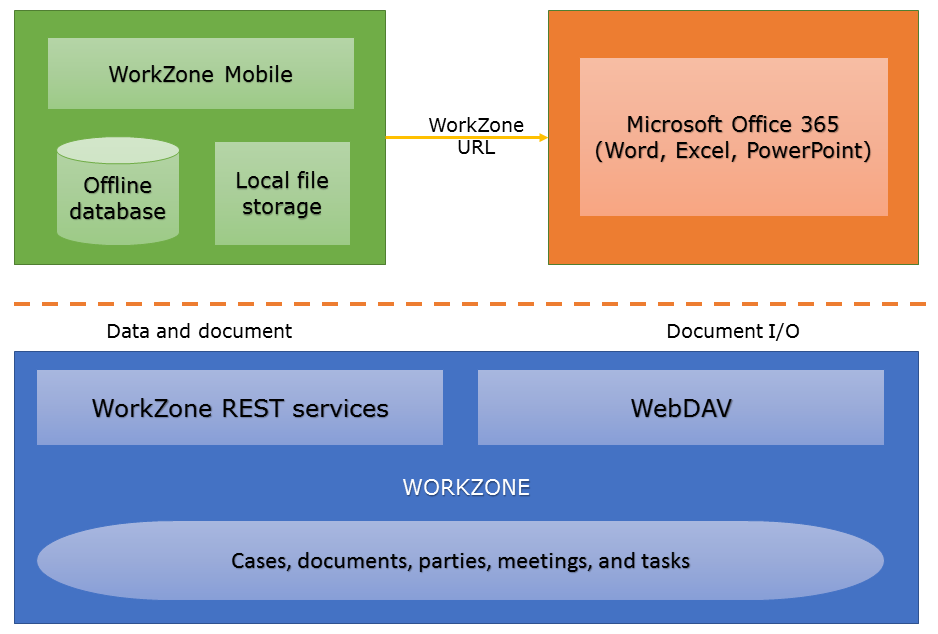
- WorkZone is the back-end case and document management system. WorkZone stores and manages data on cases, documents, parties, meetings, and tasks. The data is exposed through standard REST services and WebDAV.
- WorkZone Mobile (Legacy) is a client. It fetches data through the WorkZone REST services and stores current meetings, tasks, and their related documents locally on the device for improved performance and offline scenarios. Data and documents that are no longer relevant are removed automatically from the app storage. WorkZone Mobile (Legacy) interacts with other apps and allows scenarios for copying documents to other apps, and most importantly it supports scenarios for editing documents directly from Office 365. The editing is done through parsing a WebDAV URL to Word, Excel, or PowerPoint.
- Microsoft Office 365 – Office is used for mobile document editing of WorkZone documents. This is done using direct access to WorkZone WebDAV services. Office 365 gets the WebDAV URL from WorkZone Mobile (Legacy), and then Office 365 and WorkZone WebDAV services handle the document I/O (check-out, save, check-in). Note that only Office formats supported by Office 365 mobile apps work.