WorkZone PDF Engine scalability (HTTP load balancing using ARR)
You can configure Application Request Routing (ARR) to load balance HTTP requests to achieve high availability and scalability. This topic describes some of the features that Application Request Routing uses to monitor the health of the content servers and collect requests from a client to a content server.
About HTTP load balancing
The purpose is to load balance HTTP requests across several content servers using Application Request Routing as displayed below:
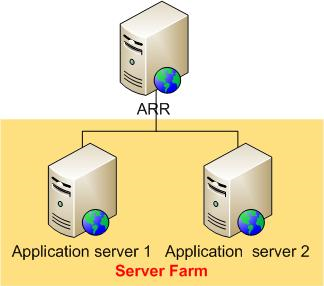
Each application server hosts WorkZone PDF Engine whereas ARR is a web farm controller.
Prerequisites
To configure the Application Request Routing module to load balance HTTP requests, the following requirements must be met.
- IIS 7.0 or newer, on Windows 2008 or newer.
- Microsoft Application Request Routing Version 1 and dependent modules.
- A minimum of two content servers with working sites and applications.
If the Application Request Routing module version 1 is not already installed, you must install it.
- Microsoft Application Request Routing Version 1 for IIS 7 (x86) - click here to download.
- Microsoft Application Request Routing Version 1 for IIS 7 (x64) - click here to download.
Follow the steps outlined in the Install Application Request Routing document to install Application Request Routing.
Another prerequisite is that the reader has defined and configured a server farm using the steps outlined in Define and Configure an Application Request Routing (ARR) Server Group.
For more information, see Application Request Routing (External link) and Using the Application Request Routing Module (External link)
Server Web Farms
Prerequisite:
You must install the Application Request Routing module before you can create a server web farm.
You can create and set up a server web farm in the Internet Information Services (IIS) Manager on the ARR machine, adding any required servers as necessary. You can add additional servers to the server farm later if the need arises.
For more information, see
Manage a Web Farm
In the Internet Information Services (IIS) Manager, you can configure, track, and manage your server farm.
For more information about configuring web farm, see Configure a Web Farm with IIS Servers.
Health check monitoring
You can configure health test monitoring in the Internet Information Services (IIS) Manager.
The Application Request Routing module monitors the health of the content servers in two ways:
- Via the live traffic
- Via an explicit URL testing
Live traffic testing
Live traffic testing is performed automatically by default when requests are made to Application Request Routing.
Explicit URL testing
The explicit URL testing is an additional test that you can use with the live traffic testing.
Tip:
- WorkZone PDF does not require caching by the Application Request Routing module and you can disable caching in the Internet Information Services (IIS) Manager.
- To avoid application server time-outs, it is recommended that you increase the time-out parameter value in the Internet Information Services (IIS) Manager.