Workflow process modelling
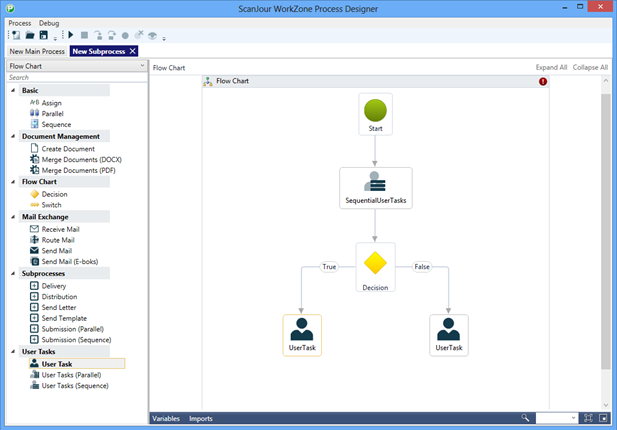
You can model workflows using the WorkZone Process Designer. This tool is a standard process modeling tool consisting of a toolbox with activities and flow control elements and a canvas for process modeling.
Create a new process
- Click New process in the ribbon.
- Drag activities and flow control elements from the toolbox ribbon to the process canvas.
- Connect the elements using arrows. Arrows define the flow of the process.
- Click on an activity to configure its properties.
- Save the modeled process as XML.
- Pack modeled processes together with their forms as a complete process package.
Standard activities
The WorkZone Process Designer has a variety of standard activities that you can use for modeling processes. The activity package contains, among others, the activities listed below. For the full list, refer to the API documentation.
Note: This list is dynamic and will be updated. You can make a request for additional generic activities to the product team.
| Icon | Activity | Element | Description |
|---|---|---|---|
 | User task | User tasks | Initiates a smart task for user interaction. |
 | User tasks (Parallel) | User tasks | A series of parallel smart tasks with interaction from multiple users at the same time. Typically used for processes of the type Hearing. |
 | User tasks (Sequential) | User tasks | Sequentially ordered smart tasks with user interaction. Typically used for processes of the types Distribution and Approval. |
 | TaskInfo | User tasks | Writes a log entry which is visible in the Process Overview. Used for writing states for end users. E.g. used in SmartPost to constantly update delivery status in the overview. |
 | Create PDF | Document | PDF activity which can merge multiple documents into one PDF, adding bookmarks and watermark to the final PDF. |
 | Merge document | Document | Document activity merging context relevant fields into a DOCX document. Compatible with merge fields in WorkZone for Office. |
 | Load Register Object | Data | Loads a WorkZone entity to be used in the process. |
 | Update Register Object | Data | Updates a WorkZone entity. |
 | Insert Register Object | Data | Creates a WorkZone entity. |
 | Start process | Process | Starts a new process. |
 | Create Process History | Sub Processes | Creates a history document on the case. The document will contain meta data on the process execution. |
 | Send to Smart Post | Smart Post | Sends to SmartPost which routes messages to Digital Post or Straalfors Connect. (Requires an extra license for Smart Post). |
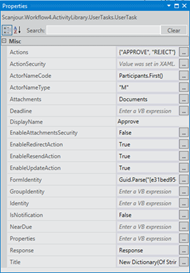
Example: Configuration of properties on a user task.