About Cases
A case in WorkZone is called File when using OData. The File is the most versatile object in WorkZone, which can take on many meanings, for example a File could represent a social case, a complaint, a construction project, an application, a project, a sales opportunity, a building, a contract and more.
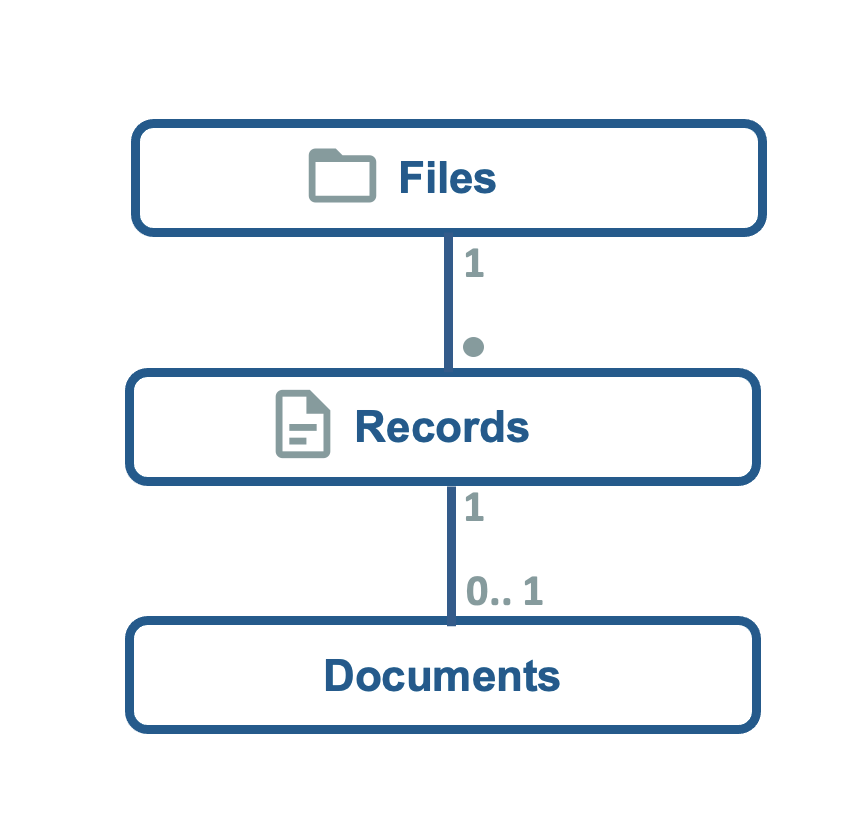
A File can have one or more Records attached to it as well as have no Records attached. A File relates to Records and documents to Documents. In WorkZone Client you will see this as a list of documents on a case. Every line in the document list on a case is document information retrieved from the connected Records.
About File classifications
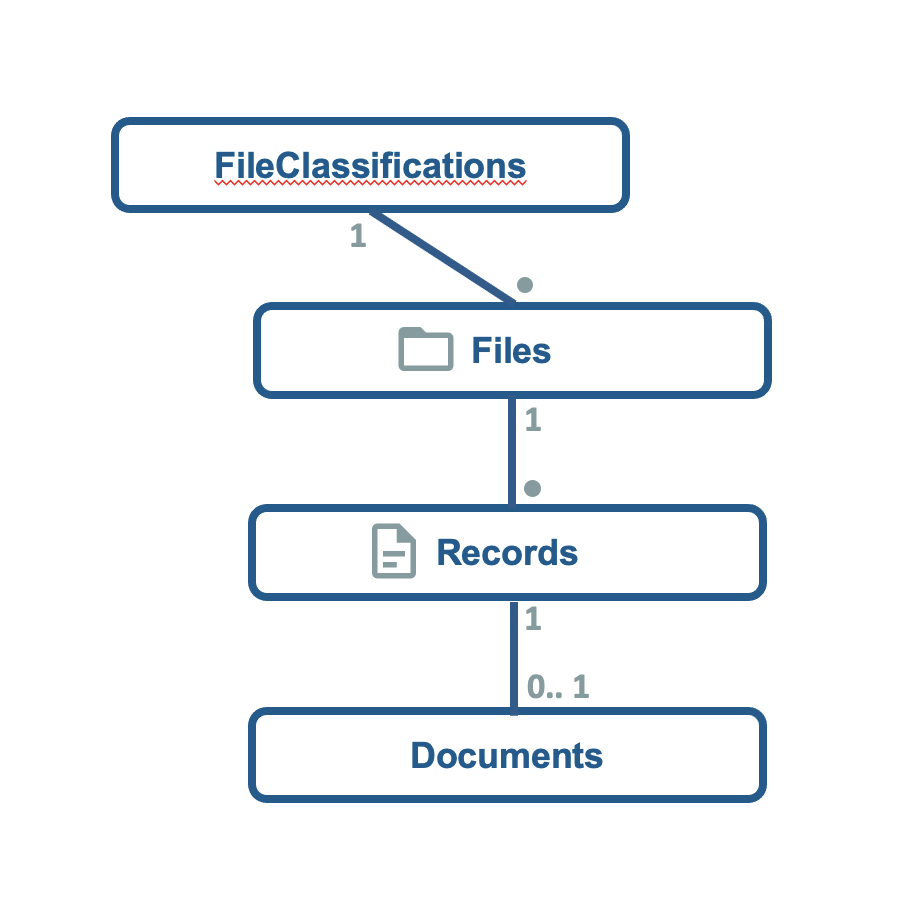
The FileClassification is the main subject term of a case. The FileClassification is a hierarchy of subject terms used to classify the subject of a case.
One subject term in the FileClassification hierarchy is called a Case Group or in OData, a FileClass.
A File must always have a FileClass, pointing to the FileClassification.
Most used field names in WorkZone Client and their OData counterparts
In the table below, some of the commonly used Case field names in WorkZone Client are displayed as well as their OData names and notes about the functions of the field.
| WorkZone Client | OData name | Mandatory | Notes |
|---|---|---|---|
|
Title |
Title |
Yes |
The title of the case. Often used as the name of the case. |
|
Case group |
FileClass_Value |
Yes |
A categorization of the cases in your organization. FileClass is the OData term for case group. The entire plan of case groups is called FileClassifications. Case groups can be created and customized in WorkZone Configurator to suit your organizations requirements. |
|
Child case group |
SubNo_Value |
No |
An optional further categorization of the cases within a particular case group in your organization. |
|
Case handler |
Officer_Value |
No |
The WorkZone user responsible for the document. |
|
Responsible unit |
ResponsibleOU_Value |
No |
The WorkZone Unit responsible for the document. |
|
Case type |
FileType_Value |
No |
An additional categorization option for cases. Case types can be created and customized in WorkZone Configurator to suit your organizations requirements. |
|
State |
State_Value |
No |
The process state or phase of a case within the case management workflow for the organization. The domain for the State field can be fully managed by an administrator. Case states can be created and customized in WorkZone Configurator to suit your organizations requirements. |
|
Created date |
Created |
No |
The date the case was created in WorkZone. |
|
Create by |
CreateUser_Value |
No |
The WorkZone user who created the case. |
|
Planned closing date |
PlanCompleted |
No |
The expected date the case is to be closed by. The field may be used to track progress and measure performance. |
|
Closed date |
Closed |
No |
The date the case was closed. Setting a date in the Closed field has the following effects:
A closed case can be reopened a case, which will clear the Closed field. |
|
Read access |
AccessCode |
Yes |
Determines which users may read the case. Case will not be displayed to users that do not have the necessary Read access to them. You can set any combination of users, units and groups in the Read access field. When setting read and write access, you must also include yourself if you are to be able to view or edit the document. |
|
Write access |
UpdateCode |
No |
Determines which users may edit the case. You can set any combination of users, units and groups in the Write access field. When setting read and write access, you must also include yourself if you are to be able to view or edit the case. |
|
Previous case number |
PreviousNo |
No |
If the case has changed case number, the previous case number will be displayed in this text field. |
|
Default document classification |
DefaultRecordClassification_Value |
No |
Every document must be classified according to the Document Classification Domain. When this field is defined, all documents created on the case/context will be classified with this document classification by default. Document classifications as well as the default Document classification can be created and customized in WorkZone Configurator to suit your organizations requirements. |
|
Case Category |
FileGroup_Value |
No |
The category of the case determines what kind of case is being created and is selected as the first step in manual case creation. The case category field is not displayed on the case detail page in WorkZone Client, but implicitly defines the typification of the case for example a complaint, an application, or a contract. The Case Category determines the layout of fields and their rules in WorkZone Client for a case and case detail pages can be configured differently for each case category if necessary. |