WorkZone Process components
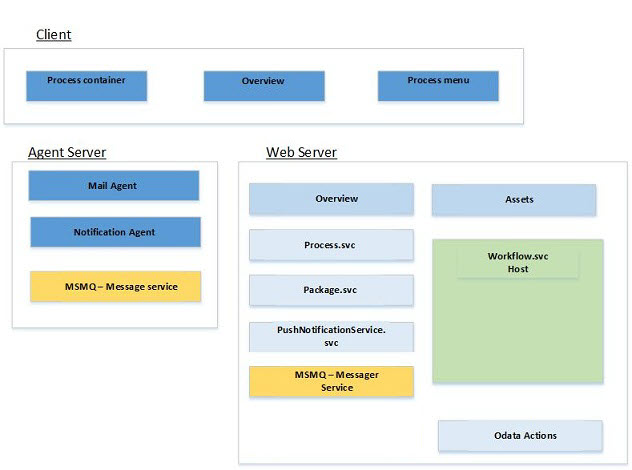
The WorkZone Process overview below illustrates WorkZone Process components of an agent server and a web server installation of WorkZone Process.
WorkZone Process is composed of a set of components. In the following overview the components are grouped according to the installation method which can be either by an agent server or by a web server.
| Component | Description |
|---|---|
| Process container |
Allows installation and configuration of all WorkZone Process components. |
| Overview |
A single page application which allows viewing the status of all processes, the status of their tasks, and performing actions on both. |
| Process menu | Client-implemented context-sensitive menu option that is populated with processes available in the current context. By calling Process.svc//Definitions/{register}/{systemKey=null} the client gets available process for this context. |
Agent server installations
The agent server installs Windows Services. Windows Services manages WorkZone Process related communication services.
| Component | Description |
|---|---|
|
Mail agent |
Windows service that sends smart mails to actors. |
| Notification agent |
Windows service that sends push notifications.
|
| MSMQ | Receiving message queue that handles messages to the notification agent. For example, push notification messages for WorkZone Task. |
Web server installations
The web server installation requires Internet Information Services (IIS) such as rest service end points. The ISS must be activated from Windows NT. Also, a queue and a workflow host are required components.
| Component | Description |
|---|---|
Workflow.svc
|
REST service for workflows serviced by the workflow host. |
Package.svc
|
REST service that handles package installation. The service allows loading/deployment of a package to a server. |
Process.svc
|
Primary REST service for process, getting process information, starting a process, getting process forms, and doing process actions. |
PushNotificationService.svc
|
REST service for registering push notification receivers. |
| MSMQ | Receiving message queue that handles messages to the notification agent. For example, push notification messages for WorkZone Task. |
| OData Actions | OData extensions that extend WorkZone Process registers by adding actions to them. This allows having one single interface for communication with OData and the WorkZone Process Host. |