Configure packages
In WorkZone Process, you can model processes in process packages. A process package contains a process configuration and forms.
A simple package contains the following basic configuration elements:
- Package.xml - A package configuration file that contains the configuration of the package forms and the processes.
- UI- A folder that contains the form view and controller. If you use it for further customizations, this folder can also contain localization files, layout files, and icons (seeForms) about form configuration.
- Init.htm
- The visual implementation of the Process start form.
- Init.js
- Validation logic and business rules for the Process start form.
- Task.htm
- The visual implementation of Smart Task.
- Task.js
- Validation logic and business rules for the Smart Task form.
- Workflows - Contains the package workflow (see Workflow process modelling for information on workflow modeling).
- Workflows.xaml - The workflow configuration.
The example below shows a simple package configuration file, which is configured with two forms and one workflow.
Example
<?xml version="1.0" encoding="utf-8" ?>
<Package>
<Formularer>
<FormDefinition>
<FormGuid>{709f3330-9190-4cc9-a7d5-0b30edef0e6e}</FormGuid>
<Name>Init.Submission</Name>
<Default>J</Default>
<ContentType>TEXT/HTML</ContentType>
<ContentFile>ui\init.Submission.html</ContentFile>
<ControllerFile>ui\init.Submission.js</ControllerFile>
</FormDefinition>
<FormDefinition>
<FormGuid>{e31bed95-94f3-4c61-a37c-5460411621cd}</FormGuid>
<Name>Task.Submission.Approve</Name>
<Default>J</Default>
<ContentType>TEXT/HTML</ContentType>
<ContentFile>ui\task.Submission.Approve.html</ContentFile>
<ControllerFile>ui\task.Submission.Approve.js</ControllerFile>
</FormDefinition>
</Formularer>
<Workflows>
<WorkflowDefinition>
<Version>1.0.0.0</Version>
<XamlFile>Workflows\Submission.xaml</XamlFile>
<FormGuid>{709f3330-9190-4cc9-a7d5-0b30edef0e6e}</FormGuid>
<AccessCode>ALLEEMNER</AccessCode>
<Standard>J</Standard>
<Processes>
<ProcessDefinition>
<ProcessGuid>{68D5E05E-C079-4A76-8CEB-B8EC44EDA56B}</ProcessGuid>
<Type>MAIN</Type>
<Name culture="en-GB">Basis Submission</Name>
<Description>Basis process</Description>
<DisplayOrder>666</DisplayOrder>
<DurationUnit>D</DurationUnit>
<DefaultDuration>15</DefaultDuration>
<AccessCode>ALLEEMNER</AccessCode>
<Package>Scanjour.Process.Basis</Package>
</ProcessDefinition>
</Processes>
</WorkflowDefinition>
</Workflows>
</Package>
Form configuration
Each forms package must contain a FormDefinition node in the Forms section:
Basic form configuration
Example
<Forms>
<FormDefinition>
<FormGuid>{F3C3A448-F378-4AB9-8729-821941BBD9B0}</FormGuid>
<Name>Init.Submission</Name>
<Default>J</Default>
<ContentType>TEXT/HTML</ContentType>
<ContentFile>ui\init.Submission.html</ContentFile>
<ControllerFile>ui\init.Submission.js</ControllerFile>
</FormDefinition>
Where:
FormGuidis the unique identifier of the form.Nameis the name of the form.Defaultis "J". Do not change the value.ContentTypeis the type of content, usually "TEXT/HTML".ContentFileis the path to the file (in the zipped package) that contains the visual implementation of the form.ControllerFileis the path to the file that contains the logic of the form.
SmartTask form configuration
If it is a SmartTask form, the configuration must contain additional elements depending on which controls are used.
If the SmartTask form contains controls with dynamic data, the form configuration must contain a corresponding DataContextDifinition node.
Example
FormDefinition>
<FormGuid>{21685432-EC7F-45FF-BB11-D1D4A7A04D16}</FormGuid>
<Name>Task.Submission.Approve</Name>
<Default>J</Default>
<ContentType>TEXT/HTML</ContentType>
<ContentFile>ui\task.Submission.Approve.html</ContentFile>
<ControllerFile>ui\task.Submission.Approve.js</ControllerFile>
<Data>
<DataContextDefinition>
<Name>ActiveActors</Name> <Query>WzpUserTasks?$expand=NameKey&$select=InstanceId,NameKey_Value,TaskState_Value,NameKey/ID,NameKey/Summary,NameKey/NameType_Value,NameKey/NameCode&$filter=InstanceId eq '{0}' and (TaskState_Value eq 'OPEN' or TaskState_Value eq 'PENDING')&$orderby=TaskOrder</Query>
<MaxOfflinePages>10</MaxOfflinePages>
<Parameters>
<Parameter>InstanceId</Parameter>
</Parameters>
</DataContextDefinition>
</Data>
</FormDefinition>
Where:
Nameis the key of DataContext (specified for standard controls). If you add custom controls, you need to add a DataContextDefinition that corresponds to it).Queryis the OData query used for collecting dynamic data.MaxOfflinePagesis the maximum number of OData pages that are sent as offline data.Parametersis a list of parameters used in the query (see examples in the Basis package).
Standard DataContextDefinition controls
The table below lists DataContextDefinition standard controls:
| Control | DataContextDefinition Name | Query and Parameters |
|---|---|---|
| wzp-process-log | ActionLog |
<Query>WzpUserTasks?$select=NameCode/Summary,ProxyCode/Summary,ID,Importance_Value,TaskSchedule_Value,Title,Comment,NameCode_Value,NameOu_Value,ProxyCode_Value,ProxyOu_Value,Closed,Opened,Created,DueDate,NearDueDate,TaskAction_Summary,TaskState_Value,TaskAction_Value,TaskType_Value&$expand=NameCode,ProxyCode&$filter=Show eq true and InstanceId eq '{0}'&$orderby=TaskOrder</Query> Parameters> <Parameter>InstanceId</Parameter> </Parameters> |
| wzp:smart-task-details-section | MainPhases |
<Parameters> <Parameter>TaskId</Parameter> </Parameters> |
| wzp:answers-and-comment | AnswerDocuments |
Query>Records?$select=ID,Summary,DocumentType_Value,State_Value,Extension&$orderby=Mru/Favorite,Mru/Updated desc,Updated desc&$filter=FileKey_Value eq '{0}' and State_Value ne 'UP' and ExternalDocId ne ''</Query> <Parameters> <Parameter>RegisterKey</Parameter> </Parameters> |
SharedDataContextDefinition
You can also create data context, which is shared by SmartTasks forms in a package.
Example
<Forms>
<FormSharedData>
<SharedDataContextDefinition>
<Name>ActionLog</Name>
<Query>WzpUserTasks?$select=NameCode/Summary,ProxyCode/Summary,ID,Importance_Value,TaskSchedule_Value,Title,Comment,NameCode_Value,NameOu_Value,ProxyCode_Value,ProxyOu_Value,Closed,Opened,Created,DueDate,NearDueDate,TaskAction_Summary,TaskState_Value,TaskAction_Value,TaskType_Value&$expand=NameCode,ProxyCode&$filter=Show eq true and InstanceId eq '{0}'&$orderby=TaskOrder</Query>
<MaxOfflinePages>3</MaxOfflinePages>
<Parameters>
<Parameter>InstanceId</Parameter>
</Parameters>
</SharedDataContextDefinition>
And then this shared data context can be used in any SmartTask definition in this package by the Name key.
Example
<FormDefinition>
<FormGuid>{B67DC731-9F6D-4A61-84F5-DEE028122D42}</FormGuid>
<Name>Task.Submission.Rejected</Name>
<Default>J</Default>
<ContentType>TEXT/HTML</ContentType>
<ContentFile>ui\task.Submission.Rejected.html</ContentFile>
<ControllerFile>ui\task.Submission.Rejected.js</ControllerFile>
<Data>
<DataContextDefinition>
<SharedName>ActionLog</SharedName>
</DataContextDefinition>
</Data>
</FormDefinition>
Details Section control
The SmartTask form contains a details section control. This section controls information about the SmartTask, online Help link, Print and Pdf buttons as well as the description.
Example
<form autocomplete="off" name="taskform" class="wzp-usertask-form" ng-cloak>
<div class="wzp-task-page">
<wzp:smart-task-details-section
source="context.context"
title-label="TITLE"
title-label-group="TASKHEARINGSUMMARY"
help-link="Default.htm#Basis_package/Hearing_summary.htm%3FTocPath%3DWorkZone%2520Process%2520Basis%2520Package%7CBasis%2520hearing%2520processes%7C_____6">
</wzp:smart-task-details-section>
If the SmartTask is part of a phase process, it also contains a phase bar and phase process information.
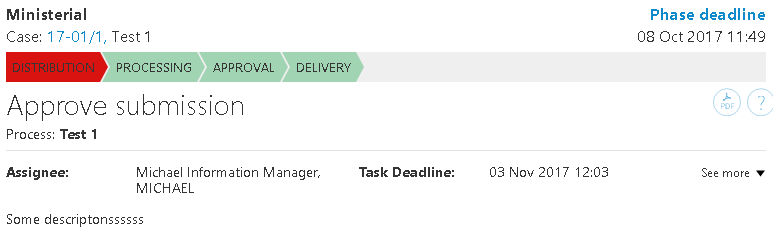
By default, the details information is shown in collapsed mode but it can be expanded to see more information.
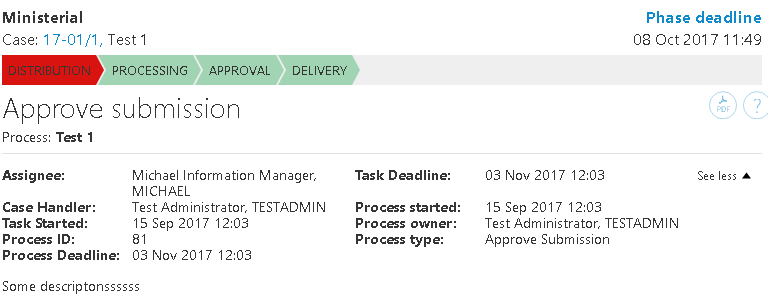
This control requires the DataContextDefinitions “ActionLog” in the package.xml file, either directly or by SharedDataContextDefinition.
The query for this DataContextDefiinition is:
<Query>WzpUserTasks?$select=NameCode/Summary,ProxyCode/Summary,ID,Importance_Value,TaskSchedule_Value,Title,Comment,NameCode_Value,NameOu_Value,ProxyCode_Value,ProxyOu_Value,Closed,Opened,Created,DueDate,NearDueDate,TaskAction_Summary,TaskState_Value,TaskAction_Value,TaskType_Value&$expand=NameCode,ProxyCode&$filter=Show eq true and InstanceId eq '{0}'&$orderby=TaskOrder</Query>
<Parameters>
<Parameter>InstanceId</Parameter>
</Parameters>
Deploy packages
You can deploy a process package to development, test, and staging environments in WorkZone Configurator , see Add or update a process package in the WorkZone Configurator Administrator Guide.