Deadline principles
Deadline rules
In WorkZone Processyou can configure phase process using various deadline rules. The deadline rules control if a phase is within the deadline, close to the deadline (near due) or if the deadline has passed (overdue).
You can also configure deadline based events. See Phase events.
You can see the state of the phase process indicated by colored icons in the WorkZone Process process overview:
- Green: Within deadline.
- Yellow: Near due.
- Red: Overdue.
Deadlines are calculated based on various units which are defined on the process itself.
The following units are available:
| Unit | Description |
| Days | Based on a 7 day week. |
| Work days | Based on a 5 day week. |
| Søgnedage | Danish term for work days minus public holidays as defined by the Danish Parliament. |
| Hours | Based on hours. You can configure a phases of a phase process using various rules by setting the Duration parameter on a phase. |
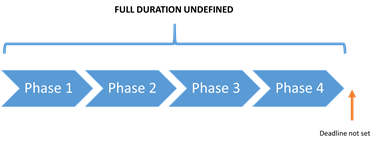
| Phase without duration and deadline | Duration is set to empty. The deadlines of the phase are dependent of the surrounding phases. |
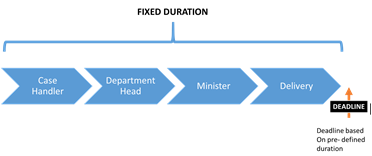
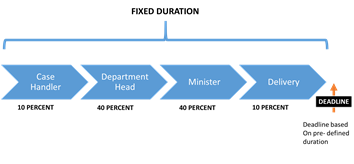
| Phase with fixed duration | Duration is set to a fixed value, for example 10 for 10 of the calculation model units. |
| Phase with relative duration | Duration is set to a relative value (percentage), for example 50%. |
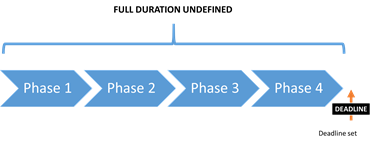
| Phase deadline on specific date | The phase deadline is set by the user or by a defined rule. |
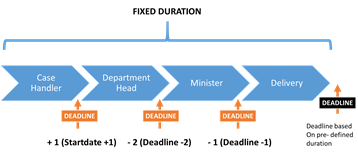
| Relative phase deadline from process start | Duration is set to for example +2, meaning two units from the start of the phase process. |
| Relative phase deadline from process deadline | Duration is set to for example -2, meaning two days from the phase process deadline. |
You must assign a deadline to the phase process.
See examples of phase processes configured with deadline rules below.
No deadline
|
Deadline defined
|
Fixed duration
|
Phases distributed by percent
|
Phases distributed relative to start time and deadline |
Phase events
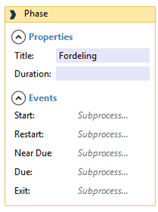
Every phase has multiple possible events. You can configure a phase to activate one or more processes.
In the event properties, configure the event by dragging one or more processes to the event.
| Phase | Event is triggered by: |
| Start | Promoting to the phase. |
| Exit | Promoting from the phase. |
| Restart | Demoting to the phase. |
| Near due | The phase has reached near due. |
| Due | The phase is overdue (the deadline has passed). |