SmartPost dispatcher classes, interfaces, and attributes
The implementation of a dispatcher requires developing classes that implement specific interfaces and export attributes that enable them to be discovered by the dispatcher framework.
The Workzone.Dispatcher.Base.dll assembly contains the definition of the interfaces and all helper classes that the interfaces need.
The .NET Framework assembly System.ComponentModel.Composition.dll contains the attribute class used for export. These assemblies must be referenced from the Visual Studio project that builds the new dispatcher.
The class diagram below shows classes and interfaces that must be implemented in a dispatcher:
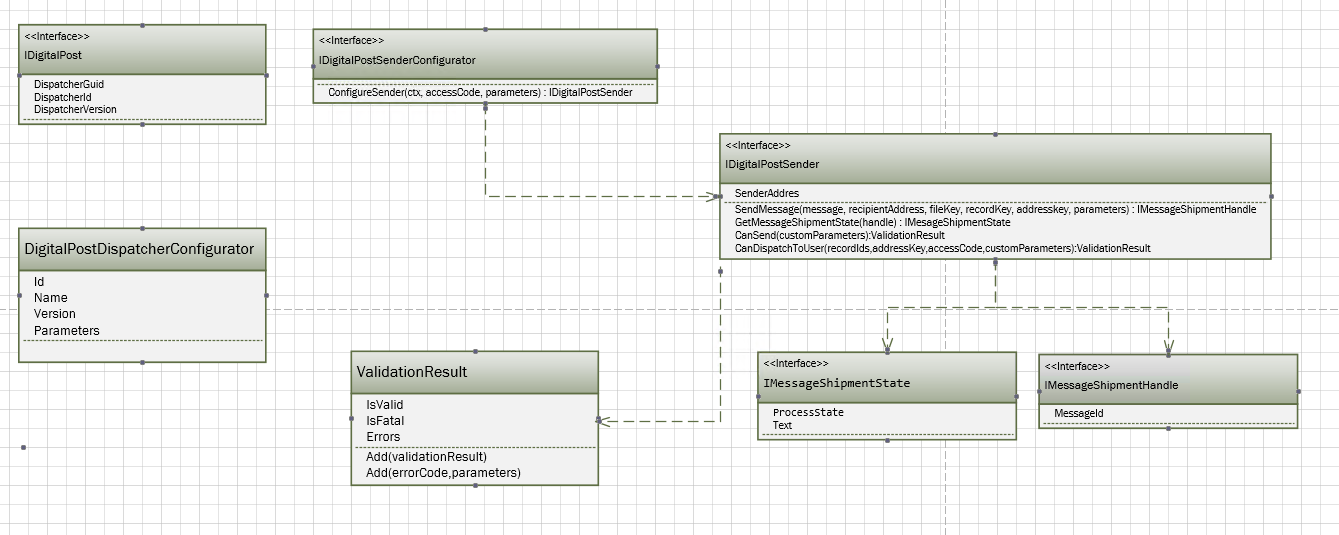
Implement IDigitalPost interface
The main interface in a dispatcher is IDigitalPost interface. Implementing this interface describes the version and unique ID of the dispatcher.
Properties
| Name | Description |
Example value |
|---|---|---|
| DispatcherGuid | A GUID that identifies the dispatcher. | 6fbb4267-2edd-495a-ae55-1075743b9286 |
| DispatcherId |
A property that can hold the ID of the dispatcher. The value of this property is normally not used or provided by the dispatcher. |
|
| DispatchVersion |
A version string that matches the latest version of WorkZone Process. |
20.0.0.0 |
For the class that implements this interface to be discovered by the dispatcher framework, it is required to add an Export attribute to the class that exports the IDigitalPost type (use System.ComponentModel.Composition.ExportAttribute).
Implement IDigitalPostSenderConfigurator interface
The IDigitalPostSenderConfigurator interface only has one method that returns an initialized class that implements IDigitalPostSender.
Methods
| Name |
Description |
|---|---|
| ConfigureSender |
Returns an instance of a class that implements IDigitalPostSender. Normally, this method reads the settings and passes values to the sender class in the constructor. The parameters for this method are:
|
For the class that implements this interface to be discovered by the dispatcher framework it is required to add an Export attribute to the class exporting the IDigitalPostSenderConfigurator type.
Example
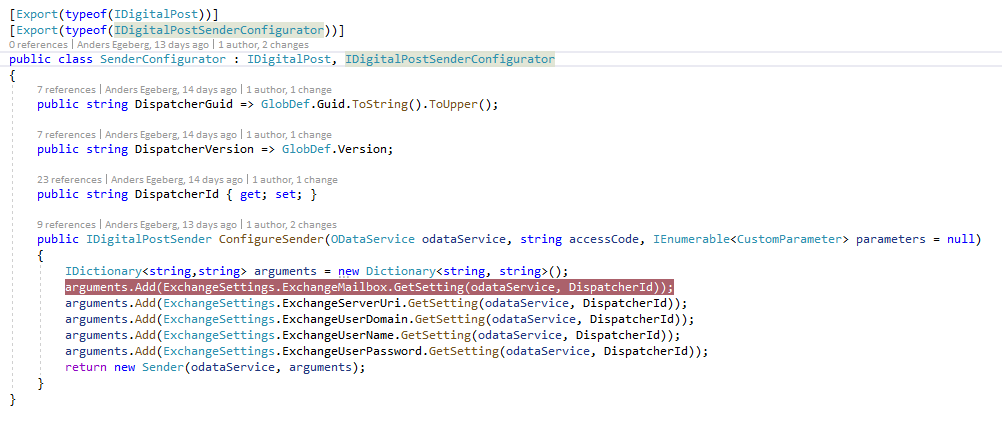
In the Exchange dispatcher example, the SenderConfigurator class both implements IDigialPost and IDigitalPostSenderConfigurator. The ConfigureSender method reads the settings into a dictionary and passes this dictionary to the constructor of the ConfiureSender class (this class implements IDigtalPostSender) together with the oDataService.
Implement IDigitalPostSender interface
The class that implements IDigitalPostSender is the class that has the logic for dispatching messages and validating the dispatcher configuration as well as the dispatches before dispatching to a specific recipient.
Methods
|
Name |
Description |
|---|---|
| SendMessage |
Sends a message to a recipient. A prebuilt message is handed over to the method but it is also possible to use other data about the recipient, case, or document using the keys supplied in the arguments. The oDataService supplied in the DigitalPostSenderConfigurator::ConfigureService can be used for querying the WorkZone database. The arguments for the method are:
The method must return an instance of a class that implements the IMessageShipmentHandle interface. This value can be used by the dispatcher framework to query for the state of the dispatch using the GetMessageShipmentState method. |
| GetMessageShipmentState |
Returns the state of the message from the dispatcher client.
The return value is an instance of a class that implements the IMessageShipmentState interface. |
| CanSend |
Validates if the dispatcher is able to send messages using the current configuration. For example, if the dispatcher needs a network connection to send a message, this method will validate that the connection is successful. This method is called before the SmartPost process is started to prevent starting a SmartPost process that is not able to send messages. The return value is ValidationResult that contains a set of errors. |
| CanDispatchToUser |
Validates if it is possible to send a document (record) to a specific user. The arguments are:
Return value is a ValidationResult that contains a set of errors. |
Properties
|
Name |
Description | Type |
|---|---|---|
| SenderAddress | The dispatcher framework adds the SenderAddress to the message object that is passed to SendMessage. |
PartyAddress including postal address. |
Exception handling
If an exception is thrown during the dispatch, the dispatcher framework resolves the action to take by comparing the exception with the values in the wzp_filtering_entry table. If a matching entry is found, the row in wzp_error_manager determines how to act on the error. Possible actions are:
- TryNextSource—It is not possible to send to this user. If there is another dispatcher in the current dispatcher sequence, it should be used instead.
- NotifyUserAndAbort—The dispatch failed and it should not be sent using another dispatcher.
- Retry—A temporary communication error occurred. Retry is done after a delay. You can configure the number of retries and the delay in the wzp_error_manager table. Default is 180 times with an interval of 900 seconds.
Implement IMessageShipmentHandle interface
This interface is used by the framework to keep track of messages that have been sent.
Properties
|
Name |
Description | Type |
|---|---|---|
| MessageId | A message ID used to identify the message. |
String |
Implement IMessageShipmentState interface
The IMessageShipmentState interface is used to get the state of a message that has been sent. It is assumed that the dispatcher implementation can retrieve information about the progress of the dispatch to the recipient.
Properties
|
Name |
Description | Type |
|---|---|---|
| ProcessState | The current state of the dispatch. |
MessageShipmentProcessState |
|
Text |
A description of the state that can be used in logs and reports. |
String |
Use of ValidationResult class
The ValidationResult class is used as return values on the CanDispatchToUser and CanSend methods on the IDigitalPostSender. The methods and properties on the class cannot be overridden.
The errors added to a ValidationResult are localized in the database. To create an error message that can be displayed to the user, the code must be added to wzp_error_message and localized versions of the message must be added to wzp_error_message_lang.
Properties
|
Name |
Description | Type |
|---|---|---|
| IsValid | Used by the dispatcher framework to determine if the result is OK. If no errors are added, the result is regarded as valid. | Bool |
| IsFatal |
If this property is true, the dispatch will fail even if the dispatch sequence includes another dispatcher. |
Bool |
|
Errors |
The list of errors that prevents the dispatcher from sending the message. |
IEnumerable<MessageEntry> |
Methods
|
Name |
Description |
|---|---|
| Add (ValidationResult) |
Merges a validation result into the current instance. |
| Add (errorCode,parameters) |
Used to add a new error message to the list of errors.
|
Example of definition and use of error message
The exchange example dispatcher has defined an enumeration of errors called CustomInfoEnum.
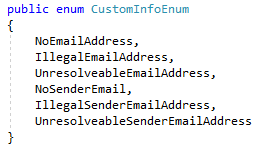
The SQL script messages.sql inserts the values in wzp_user_message and wzp_user_message_lang. This is the part of the script where NoEmailAddress is defined:

Note that the error message contains a ‘{0}’ that indicates where the ID of the recipient is placed.
In the CanDispatchToUser method, it is validated if the user has an email address – otherwise the error message is added.

Implement DigitalPostDispatcherConfigurator class
If the dispatcher has settings that a user should be able to maintain in the WorkZone Configurator, you must create a DigitalPostDispatcherConfigurator class in the dispatcher. This class does not implement a specific interface but must expose these 4 properties:
Properties
|
Name |
Description | Type |
|---|---|---|
| Id | The GUID of the dispatcher. | String |
| Name | The Name of the dispatcher. | String |
| Version | The version number string of the dispatcher | String |
|
Parameters |
The parameters that can be configured for the dispatcher. Parameters is an enumeration of tuples of 5 values that describes each configuration parameter:
The description is shown when you hover the mouse over the question mark in the WorkZone Configurator. |
IEnumerable< Tuple<string,bool,string,string,string,string> > |
The DigitalPostDispatcherConfigurator class is recognized by the dispatcher framework in a slightly different way than the other dispatcher classes. It must Export a string (not a type) with the value “DigitalPostDispatcherConfigurator”.
The sample Exchange dispatcher has 6 settings that are declared as shown below.
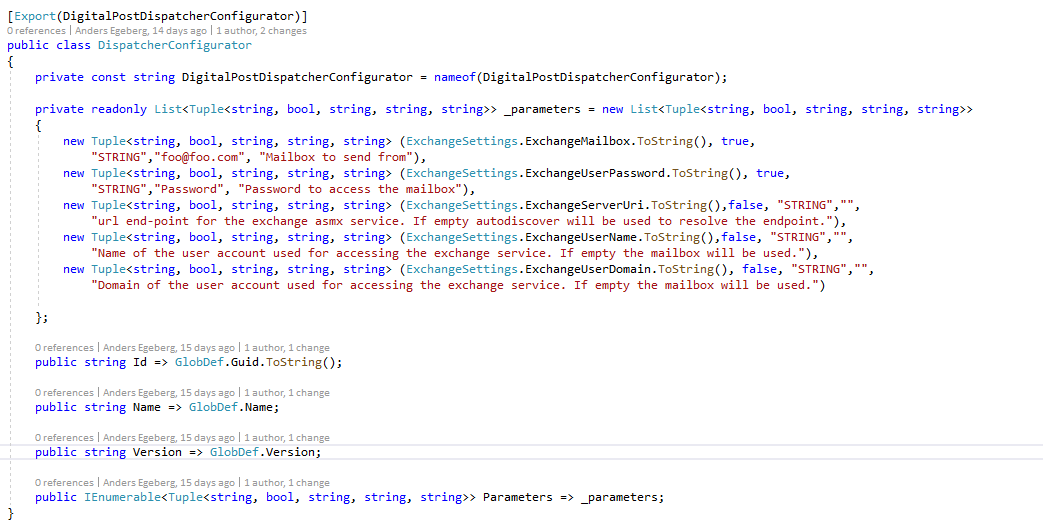
The SenderConfigurator class (that implements IDigitalPostSenderConfigurator) reads the setting values by calling DispatcherUtility.GetSetting(oDataService, enumValue.ToString(), dispatcherId) using an extension method.