WorkZone containers overview
In this article, you can gain an overview of WorkZone's container ecosystem and the individual components that constitute the container-based hosting version of WorkZone. Administering WorkZone on containers requires a general understanding and knowledge of container setup. See Prerequisite knowledge.
Kubernetes and containers
The container-based application layer of WorkZone is hosted in Kubernetes. It is important that the Kubernetes platform that you use supports both Windows and Linux. The majority of the containers are based on Microsoft Windows and only few of the containers are currently based on Linux. It is part of KMD WorkZone's long term container strategy to transition from Windows to Linux, which will gradually reduce the need for Windows support.
The diagram below shows the WorkZone containers that make up the core WorkZone platform.
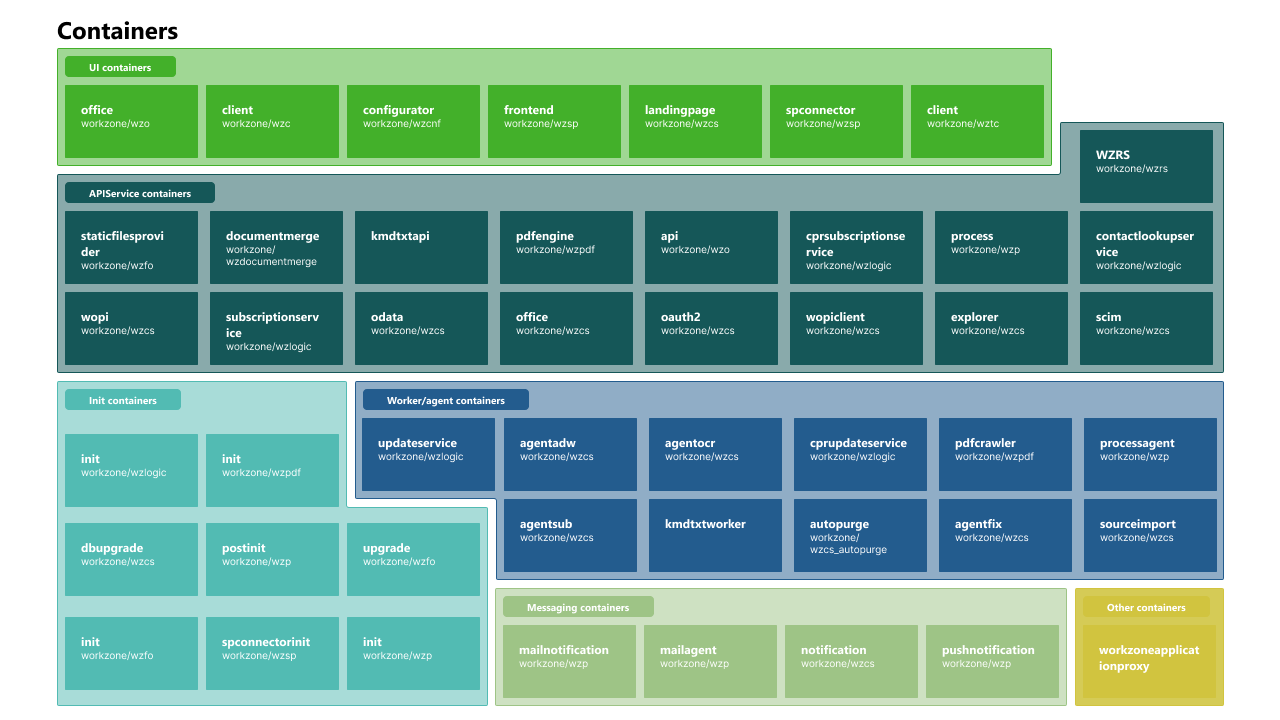
The containers are grouped with different roles:
-
Init containers
This group of containers performs initialization tasks in WorkZone such as upgrading the database to a newer schema version, installing application data, and ensuring that the container prerequisites are in place.
-
UI containers
This group of containers includes various end-user interfaces, web-based clients, and configurations.
-
API Containers
This group of containers consists of API services that take API requests, such as requests from OData, SCIM provisioning, WorkZone PDF, and WorkZone Process services.
-
Worker containers
This group of containers performs background tasks such as Optical Character Recognition (OCR) and PDF Crawler.
-
Messaging containers
This group of containers delivers messages such as push and e-mail notifications to users.
For more information about the individual containers, see WorkZone containers.