WorkZone OData specifics
OData is a generalized API which can be used in a large number of different applications, but there are a number of specific implementation details in the WorkZone OData implementation which are worth mentioning.
Identification numbers (ID's)
In WorkZone, an object is very often referenced by its unique identification number (ID) at the OData level, however, there are several IDs in WorkZone and it is therefore important to use the correct ID for queries and searches. Selecting the correct ID depends on which entity is to be queried, the data to be retrieved as well as the overall purpose and composition of the query.
The following identification fields are always present for all objects in WorkZone OData:
| Field | Description | Case examples |
|---|---|---|
|
ID |
The internal unique identifier for this object. The ID may not be visible in the user interface such as WorkZone Client, but it will always exist and when other objects are referencing this object it will be by their ID. |
67453 |
|
UserKey |
The external unique identifier for this object. This identification number is usually displayed in user interfaces to identify the object. |
2021/41-765 |
|
Summary |
A read-only computed field, which consists of selected information collected from the object to facilitate identification for a human. Example: For a case, it is the concatenation of four bits of File information: The UserKey, the case title, the case category and the officer. |
2021/41-765, New servers, Contract, HBR |
_Value or _Summary fields
In WorkZone OData, some fields in Cases, Documents or Contacts are named with the _Value suffix, for example the RecordGrp_Value field. For these fields, there will also be a corresponding field with the _Summary suffix, for example the RecordGrp_Value field and the RecordGrp_Summary field.
In addition to the _Value and _Summaryr fields, there is also a RecordGrp field, which contains the ID of the corresponding RecordGroup object.
The RecordGrp_Value field contains the ID of the specific record group in the RecordGroup object while the RecordGrp_Summary field contains a concatenation of the RecordGrp_Value and the text of the record group that fits the record group ID in the RecordGrp_Value field.
The RecordGrp field indicates which object to query (here the RecordGroup object) while the RecordGrp_Value identifies which record in the object information is to be retrieved from (For the RecordGrp example, the key that corresponds to the desired record group).
The RecordGrp_Summary field displays a selected combination of retrieved information presented for easier overview (For the RecordGr example, the unique ID used to retrieve the information and the name of the retrieved record group.)
Just as a Case has a _Summary field, so does a Record Group (for example, the ID is "CONTR" and Text is "Contract"). This results in the following values: RecordGrp_Value="CONTR" and RecordGrp_Summary="CONTR, Contract".
Example: In WorkZone Client
In the WorkZone Client user interface, the Document Group field is the RecordGrp_Value in WorkZone OData, however the Document Group field does not display values from the RecordGrp_Value field. Instead, the contents of the RecordGrp_Summary field are displayed in the field and in the drop-down list.
The RecordGrp_Value field contains abbreviated codes for the record group (for example BYG, CERT, CONTR , DO and so on) while the RecordGrp_Summary field is a concatenation of the RecordGrp_Value field (the "CONTR" part) and the text value of the RecordGrp (the "Contract" part) as it is stored in the RecordGrp entity.
The RecordGrp_Summary is displayed to provide users with the code of the Record Group as well as the text or description of the record group as well. Otherwise, the users will have to select from a list of codes instead of a list of codes and their more-readable texts.
The RecordGrp field itself is not displayed in the detail page and is only used to indicate which entity is to be queried for data (In this example, the RecordGrp entity).
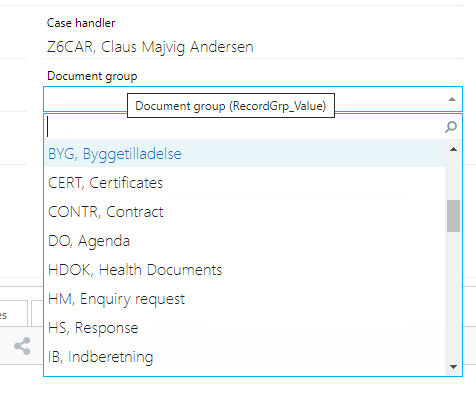
When a user selects a document group from the drop-down list in the Document Group field, the RecordGrp_Value will be stored in the field on the document (“CONTR”) and not “CONTR, Contract” that is displayed in the drop-down list.
Find the field value for a _Value field
To find the field value for any given _Value field, locate the field in WorkZone Client and open the drop-down list in the field. The field value will be displayed as the first element of the list, before the comma separator.
Tip: When using WorkZone OData to query for information, use the _Value expression as this is unique ID. The _Summary fields are concatenated strings which are much more difficult and error prone to use in queries.