2026.1
Support for Interact+ (Early Availability)
WorkZone now supports Interact+, which is the new cloud-based version of Interact. A new Interact+ connector service workflow enables WorkZone to retrieve data from Interact+ forms and perform actions in WorkZone.
If you are currently using the old Interact and want to transfer your dialogues to Interact+, please reach out to your WorkZone responsible to get started.
For more information, see Interact+ connector. You can also read more about Interact+ on the ACOS website and in the Interact+ documentation.
 2026.0
Updated handling of DCR process XML files after update
An issue where WorkZone continued using an old version of a DCR process after uploading a new XML file with the same GUID has been resolved. The issue was caused by a system cache in deployments scaled with multiple WorkZone Process pods has been fixed. Both simple and advanced DCR processes are now updated 10 minutes after upload.
2025.3
Support for robots in case activities
WorkZone now supports assigning robot roles to advanced effects. When creating a DCR process in the DCR Portal, you can apply different types of robots as roles for advanced activity effects.
See Create advanced activity effects and read more about DCR Robots in the DCR documentation.
In WorkZone Client in the case activity preview pane, users can view which activities have been executed by a robot in the Role column and see the executed actions in the activity history. Both are visible when the No filter view is selected in the activity list.
Improved case activity performance
This release includes several optimizations that make executing of case activities faster and more efficient.
2025.2
No changes in this release.
2025.1.2
SmartPost: Validate only the letter for PDF/UA compliance
In WorkZone Configurator, the SmartPost parameter ValidatePDFUA parameter has been updated. You now have the option to validate only the letter document. You should only use this option if you have a specific need for checking only the letter for PDF/UA compliance and not the attached documents.
See ValidatePDFUA.
2025.1
SmartPost: Removal of empty content controls in letters
When a standard letter contains content controls that cannot be merged due to missing information, the placeholder texts were previously visible in the final letter. Now, when you enable the Remove content control when contents are edited option in Word, SmartPost automatically removes any empty content controls and placeholder texts before sending the letter.
2025.0.1
SmartPost optimization
To enhance the SmartPost process, two new parameters have been introduced:
-
LocalPdfMerge - Optimizes the performance in an environment where the pdfservice has a high load.
-
MergePreliminaryReport - Improves performance by leaving the preliminary history document blank.
For more information about the parameters, see Configure SmartPost.
2025.0
Expanded Case monitoring service workflow
The Case monitoring workflow has been expanded to also search for cases created before the workflow was started. The new CasesCreatedFrom parameter in the settings for the Case monitoring service workflow allows you to specify the start date from which the service workflow should begin searching for cases.
See Configure a Case monitoring service workflow.
Interact connector service workflow - Desupport of the OData service for field mapping
The OData service field mapping method is desupported because it is not compatible with cloud setups. Instead, use the WZ_ODATA page method, which was introduced in 2023.3 and enhanced in 2024.0.
2024.5
Configurable deadlines
You can now configure deadlines for processes in WorkZone Configurator. You can configure a deadline for each process in the process settings, this deadline will be suggested in the Start process dialog when users start processes.
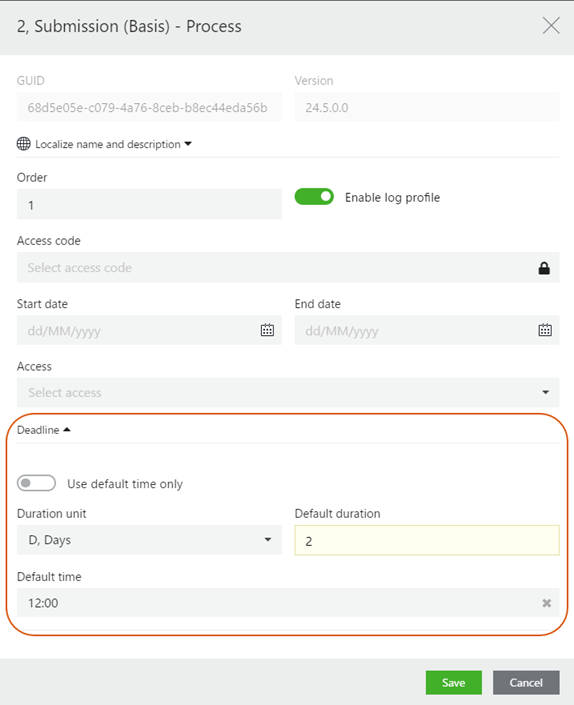
See Configure process deadlines.
SmartPost: Support for MeMo v1.2
The NgDP dispatcher now supports MeMo v1.2 from Digitaliseringsstyrelsen (Agency for Digital Government). For information about MeMo v1.2 , please refer to MeMo v1.2 dokumentation og øget validering on Digitaliseringsstyrelsen's web site.
Important:
MeMo v1.0 will be deprecated March 2025. Public authorities, that use the e-Boks dispatcher to send messages to NgDP, should switch to the NgDP dispatcher before March 2025.
Private companies cannot use NgDP; only public companies are allowed to use it. However, private companies can continue to use the e-Boks dispatcher to send messages to e-Boks. It is a matter of configuring the e-Boks dispatcher to point towards e-Boks and not NgDP.
SmartPost: Additional file types
With the MeMo v1.2 update, the number of file types that you can send or receive as documents via SmartPost has been expanded. Sending SmartPost messages is unchanged as you can only send messages as PDF documents but now SmartPost can also receive the new file types on the allowed file types list.To use a new file type, make sure that this file type is also configured in WorkZone Configurator, see Supported file types and Configure file types.
For a list of supported file types, please see Tilladte filtyper og -navne i Digital Post on Digitaliseringsstyrelsen's web site.
SmartPost: Invalid characters
The NgDP dispatcher now checks for and removes invalid characters in the file name of the generated PDF document based on the expanded list of invalid characters from Digitaliseringsstyrelsen. See Øget validering af filnavne og URI i Actions for både MeMo version 1.1 og 1.2 on Digitaliseringsstyrelsen's web site (only in Danish).
SmartPost: UseMemo12 parameter
A new UseMemo12 parameter has been added to the NgDP dispatcher. Turn on this setting if you plan to use MeMo v1.2 starting from March 3, 2025, when Digitaliseringsstyrelsen (Agency for Digital Government) releases MeMo v1.2. Please do not turn on the setting until after this date.
SmartPost: Upgrade from 2024.0 to 2024.5
In the 2024.5 release, WorkZone does not automatically convert an e-Boks push service dispatcher that was configured in 2024.0 to an NgDP dispatcher.
As of 2024.5, the e-Boks dispatcher no longer supports sending messages to NgDP. To continue sending messages to NgDP, please switch to using an NgDP dispatcher.
2024.4
No changes in this release.
2024.3
SmartPost
AllowMassDispatch parameter
A new AllowMassDispatch parameter has been added to the NgDP, Strålfors, and e-Boks dispatchers. The parameter enables use of the NgDP and Strålfors dispatchers for mass dispatches.
See Configure dispatchers and Configure WorkZone Mass Dispatch in the WorkZone Mass Dispatch Guide.
Advanced activity effects in case activities
You can now use advanced activity effects in DCR processes to call external web services from case activities.
2024.0
New service subprocess: Update municipality party
Update municipality party is a new service subprocess that you can enable to ensure that a party on a case is always synchronized to match the value of the AddressKey/Municipality property of a party role that you specify. An example where this service subprocess can be useful could be in instances where you have a case with a primary case party with the Citizen role and a case party with the Municipality role. When the citizen changes municipality of residence, it is important that the municipality party on the case is also automatically updated. See Configure an Update municipality party service subprocess.
New service workflow parameters
New service workflow parameters have been introduced that you can use to optimize performance of the Interact connector and Case monitoring service workflows.
Interact connector
Two new parameters have been added to the service workflow. A FetchInterval parameter that you can use to set the interval between fetching and processing data from Interact forms, and a RunParallel parameter that you can turn on, if you want the service workflow to run in parallel on all available servers with an agent profile.
See Configure an Interact connector service workflow.
Case monitoring
Two new parameters have been added to the service workflow. A FetchInterval parameter has been added to the Case monitoring service workflow. You can use this parameter to set the interval between identifying new cases and starting processes or case activities, and a RunParallel parameter that you can turn on, if you want the service workflow to run in parallel on all available servers with an agent profile.
See Configure a Case monitoring service workflow.
Enhanced Interact field mapping
The new way of mapping Interact form data to WorkZone data using a custom XML format (introduced with the 2023.3 release) has been enhanced.
The documentation has been update with a new topic that describes how to map fields using the WZ_ODATA page in Interact. You will also find a sample XSLT transformation and a sample XSD schema in this topic that you can copy and customize.
See Field mapping in Interact forms to WorkZone data, Map fields using a WZ_ODATA page, and Map fields using a WZ_ODATA page.