Form localization
Form Localization Concept for localization <body ui-Intl="js/init.Submission."> PO File format. POEDITOR phantomJS.. Settings ->
Configuring POEditor to work with WZP forms localization resources
- Download and install POEditor (http://poedit.net/).
- Open File > Preferences > Parsers.
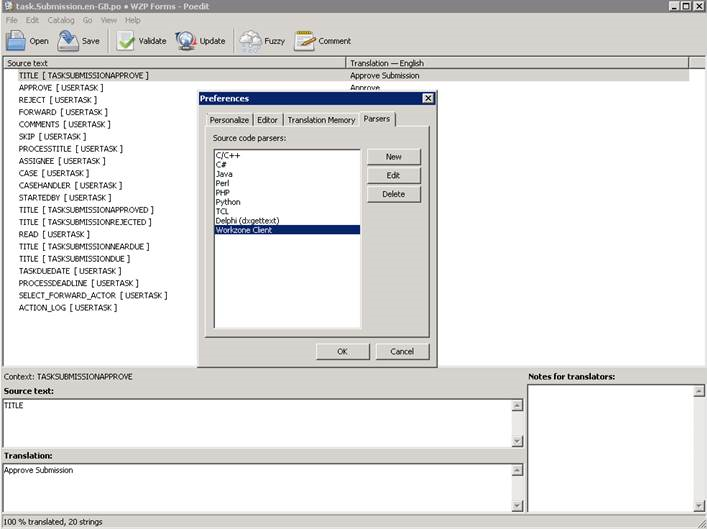
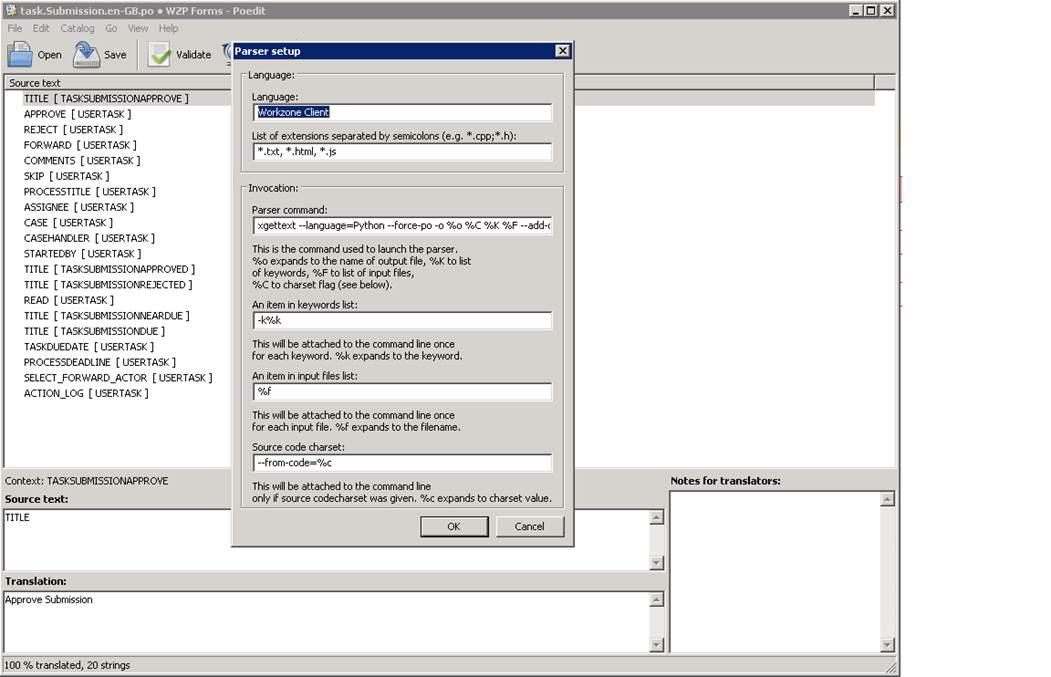
- Add new parser with the following settings:
| Language | <ParserName> (ex. Workzone Client) |
| List of extensions separated by semicolons |
*.txt, *.html, *.js |
| Parser command |
xgettext --language=Python --force-po -o %o %C %K %F --add-comments=Reference |
| An item in keywords list |
-k%k |
| An item in input files list | %f |
| Source code charset |
--from-code=%c |
Add or remove new string key in localization resources
- Check out the read-only flag from the
*.terms.txtresource and*.pofiles. - Add a new string in the format
_("KEYGROUP", "STRINGKEY")in the source file*.terms.txt. - Open each
pofile in POEditor. - Click Update.
- Check your changes in the update summary and click OK.
- Add the localized string value for the new key value.
- Save your changes.