Contact synchronization
WorkZone offers a series of modules that manage automatic import and update of CPR (person) or CVR (company) contact data into WorkZone. For information about contact synchronization, see Contact lookup and synchronization (CPR and CVR).
This page describes the configuration that is needed to deploy containers that are required to run the contact synchronization modules.
Container deployment
In addition to the WorkZone values in the values.yaml (See Prepare environment files for WorkZone container installation), you need to prepare the values that are specific to contact synchronization containers.
wzlogic:
    auth:
        wzuser: CONTACTSYNCUSER
        oid: <customer specific oid> ##Enterprise OID
    oauth2:
        clientId: ContactSyncService
    contactlookupservice:
        url: http://wzlogic-contactlookupservice/
        latestApiUrl: http://wzlogic-contactlookupservice/api/v1/ContactLookup
    contactsyncconfigservice:
        url: http://wzlogic-contactsyncconfigservice/
        latestApiUrl: http://wzlogic-contactsyncconfigservice/api/v1/ContactSyncConfiguration
    cprsubscriptionservice:
        url: http://wzlogic-cprsubscriptionservice/
        schedule: "0 4 * * 1-5"
    cprupdateservice:
        url: http://wzlogic-cprupdateservice/
    subscriptionservice:
        url: http://wzlogic-subscriptionservice/
        schedule: "0 4 * * 1-5"
    updateservice:
        url: http://wzlogic-updateservice/
    datafordeler:
        CprBaseUri: https://s5-certservices.datafordeler.dk/
        CvrBaseUri: https://s5-certservices.datafordeler.dk/
        BfeBaseUri: https://certservices.datafordeler.dk/
        EventsBaseUri: https://s5-certservices.datafordeler.dk/
	    CprGraphQLUri: https://graphql.datafordeler.dk/CPR
	    CvrGraphQLUri: https://graphql.datafordeler.dk/flexibleCurrent/v1

You can configure the values of the cprsubscriptionservice and the updateservice variables. The remaining variables in the values.yaml file are global values and should not be changed.
The environment.yaml file contains specifc Datafordeler.
wzlogic:
      datafordeler:
        CprBaseUri: https://test04-s5-certservices.datafordeler.dk/
        CvrBaseUri: https://test03-s5-certservices.datafordeler.dk/
        EventsBaseUri: https://test03-s5-certservices.datafordeler.dk/
        CprGraphQLUri: https://test04-graphql.datafordeler.dk/CPR
        CvrGraphQLUri: https://test06-graphql.datafordeler.dk/flexibleCurrent/v1
| Variable | Description | Value |
|---|---|---|
|
cprsubscriptionservice |
A service that checks Datafordeler for updated information on CPR contacts. You can configure the schedule for when the service should check for updates. If you want to change the default value, we recommend decreasing the frequency.
|
The default value is: url: http://wzlogic-cprsubscriptionservice/ schedule: "0 4 * * 1-5 which is 4 AM UTC, Monday to Friday. |
|
subscriptionservice |
A service that checks Datafordeler for updated information on CVR contacts. You can configure the schedule for when the service should check for updates. If you want to change the default value, we recommend decreasing the frequency. |
The default value is: url: http://wzlogic-subscriptionservice/ schedule: "0 4 * * 1-5 which is 4 AM UTC, Monday to Friday. |
The table below provides an overview of the of the global variables. Leave these variables as is.
| Variable | Description | Value |
|---|---|---|
|
contactlookupservice |
A service that looks up contacts in Datafordeler. |
http://wzlogic-contactlookupservice/ |
|
contactsyncconfigservice |
A service that provides the configuration API for contact synchronizations services, such as CPR/CVR lookup and update. |
url: http://wzlogic-contactsyncconfigservice/ |
|
cprupdateservice |
A service that synchronizes CPR contact changes in Datafordeler withWorkZone. |
url: http://wzlogic-cprupdateservice/ |
|
updateservice |
A service that synchronizes CVR contact changes in Datafordeler with WorkZone. |
url: http://wzlogic-updateservice/ |
|
datafordeler |
Base URIs to the Datafordeler service. |
CprBaseUri: https://s5-certservices.datafordeler.dk/ CvrBaseUri: https://s5-certservices.datafordeler.dk/ |
Secrets
This section describes how to generate the secrets that are required to deploy the contact synchronization containers.
Encryption secrets
There are two secrets that are used to encrypt and decrypt the passwords to the certificates that are used to communicate with Datafordeler.
Use the Windows and Linux built-in tool ssh-keygen to generate the two secrets.
Private:
ssh-keygen -b 2048 -m pkcs8 -t rsa -f /var/prvkey
Public:
ssh-keygen -f /var/prvkey -e -m pem >> /var/pubkey
Add the values (secrets) to the keys:
-
WORKZONE-CONTACTSYNCCONFIG-DECRYPTION-KEY
The value is the private secret that was generated above.
-
WORKZONE-CONTACTSYNCCONFIG-ENCRYPTION-KEY
The value is the public secret that was generated above.
Example:
Key: WORKZONE-CONTACTSYNCCONFIG-DECRYPTION-KEY
Value: MIIJQwIBADANBgkqhkiG9w0BAQEFAA(...) #truncated, must be one line, no line breaks.
Key: WORKZONE-CONTACTSYNCCONFIG-ENCRYPTION-KEY
Value: MIICCgKCAgEAjEErCcSmqYDaSlD70/(...) #truncated, must be one line, no line breaks.
CONTACTSYNCUSER service user secrets
The secrets below are required to get the Entra ID access token for the CONTACTSYNCUSER service user.
The secrets are available in the secret store as part of the WorkZone common secrets.
```yaml
  - name: WORKZONE_OAuth2__TenantId
    valueFrom:
      secretKeyRef:
        key: WORKZONE_AZURE_SYS_TENANTID
        name: wzcommon-secrets
  - name: WORKZONE_OAuth2__ClientId
    valueFrom:
      secretKeyRef:
        key: WORKZONE_AZURE_SYS_CONTACTSYNCUSER_CLIENTID
        name: wzcommon-secrets
  - name: WORKZONE_OAuth2__ClientSecret
    valueFrom:
      secretKeyRef:
        key: WORKZONE_AZURE_SYS_CONTACTSYNCUSER_CLIENTSECRET
        name: wzcommon-secrets
```
Installing the contact synchronization containers using werf
If you're not maintaining the common Key Vault used for storing common secrets, you can use the existing Key Vault instead. In that case, set the value of commonsecrets to false in the global environment YAML file, as shown below:
# Enable only if secret wzcommon-secrets is present
  commonsecrets:
   enabled: false
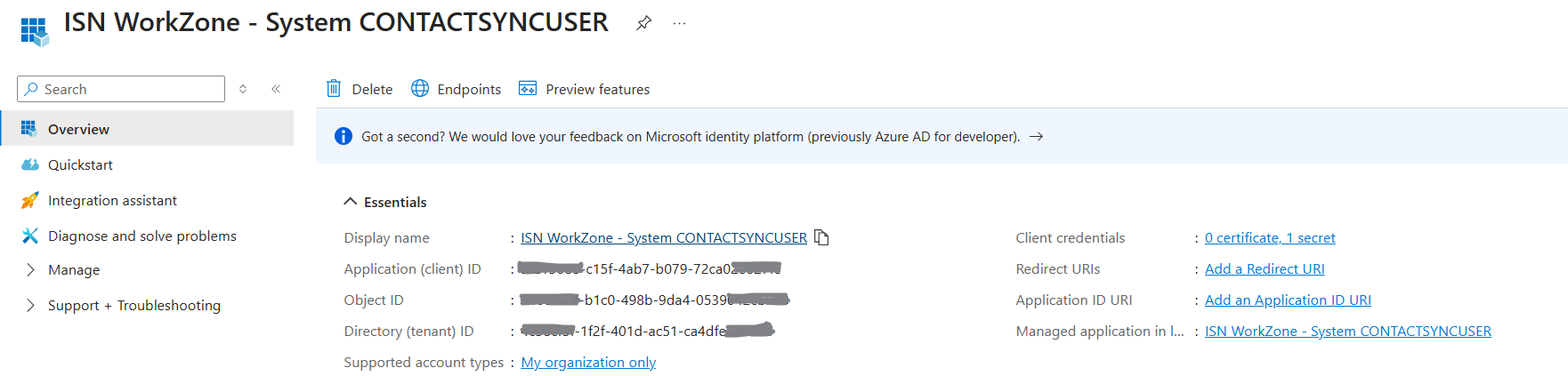
Create the app registration
-
In the tenant, go to App registrations and create a new app registration.
Example:
-
Add the secrets listed below to the Key Vault and assign each secret the corresponding values from the app registration.
-
WORKZONE-AZURE-SYS-TENANTID
The system tenant ID where the app registration is configured.
-
WORKZONE-AZURE-SYS-CONTACTSYNCUSER-CLIENTID
The application (client) ID of the app registration.
-
WORKZONE-AZURE-SYS-CONTACTSYNCUSER-CLIENTSECRET
The client secret of the app registration.
-
-
Get the Enterprise Application Object ID for CONTACTSYNCUSER and pass it to the value file.
auth:
 wzuser: CONTACTSYNCUSER
 oid: < 3df4…> # provide the Object ID here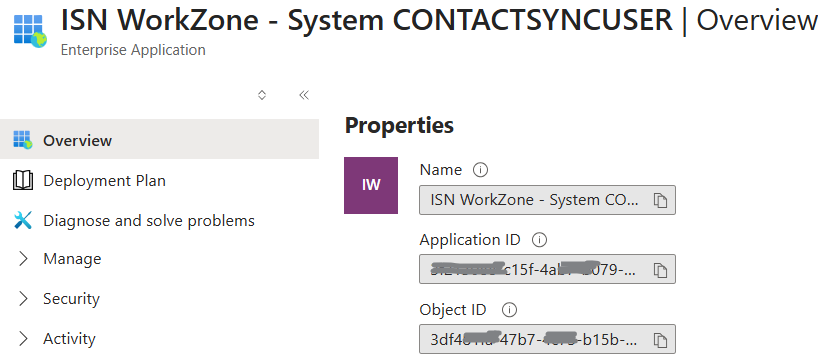
Configure the values.yaml file
-
Copy the Sample values.yaml above, and make changes to it as needed, for example change the schedules.
-
Paste your changes in to the global values.yaml file.
See Preparing container installation and Installing the WorkZone containers using a master Helm chart.
See also:
CPR Datafordeler certificates and CVR Datafordeler certificates
Contact lookup and synchronization (CPR and CVR ) Administrator Guide